How to Make Your Home Office HIPAA Compliant

A HIPAA-compliant home office means that you, as a therapist, counselor, psychologist, psychiatrist, or other healthcare professional, must protect your patients’ or clients’ protected health information (PHI). This includes implementing administrative, physical, and technical safeguards such as secure policies, password-protected systems, and documented procedures to limit risk and ensure confidentiality.
Key takeaways
- Physical safeguards are essential: A HIPAA-compliant home office requires locked storage for paper records, secured devices, a documented risk analysis, and clear policies about who may access the workspace.
- Common home-office risks: People within earshot during sessions, unsecured WiFi, unsanctioned tools without a Business Associate Agreement (BAA), and unprotected devices are frequent vulnerabilities.
- Telehealth requires care: Telehealth is permitted from home, but always verify that the platform supports encryption, provides a BAA, and aligns with your privacy and documentation needs.
What is HIPAA and why does it matter for remote work?
The Health Insurance Portability and Accountability Act (HIPAA) sets federal standards for protecting sensitive health information, including medical records and individually identifiable health data. The HIPAA Privacy Rule governs how protected health information (PHI) may be used and disclosed. The HIPAA Security Rule applies to electronic PHI (ePHI) and requires administrative, physical, and technical safeguards to ensure confidentiality, integrity, and availability.
Who must comply when working from a home office?
Covered entities—often individual clinicians who electronically transmit health information for standard transactions such as billing—must comply with HIPAA. Business associates (vendors or staff who handle PHI on your behalf) are also regulated. That means if you are:
- Sharing assessments, reviewing lab results, or accessing client records on a laptop
- Writing progress notes in a common area
- Conducting telehealth sessions from a spare bedroom
- Accessing scheduling or billing systems remotely
…you remain responsible for protecting your patients’ PHI and documenting safeguards, policies, and any agreements with vendors that handle PHI.
Protected health information in a home setting
Working from home does not remove your responsibility for PHI. In a home office, PHI can include:
- Billing records, invoices, insurance details, superbills
- Printed documents visible in the workspace
- Downloaded or locally stored files and cloud backups containing client data
- Appointment reminders sent by email, text, or through an electronic health record (EHR)
- Intake forms, treatment plans, and psychotherapy notes
Rule of thumb: any identifying information that can be traced back to a person should be protected.
Core HIPAA rules impacting home offices
HIPAA requirements remain the same whether you work in a clinic or a home office, but the risks and practical controls change. Below are the key rules and how they translate to a remote work environment.
Privacy Rule requirements in a home environment
The HIPAA Privacy Rule gives clients access to their records and limits PHI disclosure. The Notice of Privacy Practices (NPP) describes how PHI is used and disclosed and sets client expectations for privacy. In practice, consider questions like:
- Is anyone within earshot of a telehealth session?
- Are paper files stored where others could access them?
- Are you using only the minimum amount of PHI needed to complete a task?
- Is your laptop screen visible to family members, roommates, or visitors?
Security Rule obligations for remote work
The HIPAA Security Rule requires covered entities and business associates to protect ePHI by implementing administrative, physical, and technical safeguards. For remote work, this means your home office should be secured, allow controlled remote access, and include plans for incidents such as lost or stolen devices.
- Secure the physical workspace and devices
- Control who can access records and systems
- Implement procedures for lost/stolen devices or suspected breaches
- Ensure secure transmission of ePHI
Breach Notification Rule considerations for home offices
The HIPAA Breach Notification Rule requires timely notification after a breach of unsecured PHI. Affected individuals generally must be notified without unreasonable delay and no later than 60 days after discovery. Covered entities may also need to notify the Department of Health and Human Services and, in some cases, the media. Examples of incidents in a home office that could trigger a breach include:
- Leaving a workstation unattended with charts visible
- Losing an unencrypted, unprotected laptop that contains client information
- Accessing records over unsecured public WiFi
- Discussing sensitive client information where others can hear
- Leaving printed intake packets in shared areas
Minimum necessary standard when working from home
The minimum necessary standard requires limiting use, disclosure, and requests for PHI to only what is needed for a specific task, unless an exception applies. Practical examples include:
- Accessing client charts only when clinical information is required
- Printing documents only when necessary and securely disposing of them
- Ensuring screens are not visible to others
- Keeping PHI off sticky notes, whiteboards, and other visible items
Risk analysis and risk management for home offices
Identifying and assessing risks is the first step in building a compliant home office. A thorough risk analysis documents where ePHI is created, received, stored, or transmitted and identifies potential vulnerabilities.
Conducting a home office security risk assessment
Do not assume that using an EHR alone provides complete protection. Under the Security Rule, you must perform a risk analysis that addresses how and where ePHI is handled. Useful questions to guide this assessment include:
- Are personal devices used to access work systems?
- If my laptop were stolen, could someone access PHI?
- Is my WiFi secured with strong encryption and a unique password?
- Do I provide a separate, password-protected guest WiFi for visitors?
- Where could unauthorized access occur in the home?
- How would I detect compromised accounts or devices?
Identifying common home office vulnerabilities
Common vulnerabilities in home offices include:
- Using unsecured or public WiFi when away from the home network
- Failing to provide a separate guest network for visitors
- Saving passwords in browsers without workplace authorization
- Not using multi-factor authentication (MFA)
- Smart speakers or voice assistants active during clinical work
- Using email or text messaging without appropriate safeguards or agreements
- Improper disposal of printed PHI
When working outside the home, avoid public WiFi and prefer secure mobile data or a trusted VPN. For printed PHI, use a shredder and store documents in a locked drawer or cabinet until properly destroyed.
Physical safeguards your home office needs
Physical safeguards form the foundation of a HIPAA-compliant home office and cover workspace security, device management, and paper record handling.
Securing the home workspace
Treat your home workspace like a clinical environment: create a dedicated area for clinical work, lock it when not in use, and minimize opportunities for others to overhear telehealth sessions. Consider using sound machines or white-noise devices outside the room when appropriate.
Paper records and printed PHI
Paper records require strict management. If you print PHI, store it securely, avoid leaving documents in shared spaces, and dispose of them with a cross-cut shredder or secure destruction service.
Device and media controls
Consider all electronic devices that could contain PHI, including phones, tablets, external drives, printers, scanners, and backup media. Use only practice-approved devices, enable secure disposal or remote wipe procedures, and keep an inventory of devices that store or access PHI.
Technical safeguards to consider for your home office
Technical safeguards govern how ePHI is accessed, transmitted, and protected across devices, networks, and software. These measures are required under the HIPAA Security Rule for all remote providers.
Home networks and internet security
Use WPA2 or WPA3 encryption on your home router, keep firmware updated, and set a strong, unique administrator password. Create a separate guest network for visitors and use private WiFi only for accessing PHI. When necessary, use a VPN approved by your organization to protect data in transit.
Access controls and authentication
Limit system access to authorized users and enforce strong authentication. Recommended practices include:
- Unique usernames for each user and system
- Multi-factor authentication (MFA) for email, EHRs, and telehealth platforms
- Strong password policies and secure password management where allowed
- Automatic screen locks when devices are idle
- Prohibiting shared logins
- Encrypting ePHI during transmission and storage
When working remotely, prefer secure, HIPAA-aligned email and messaging tools, encrypted telehealth platforms, client portals, VPNs when needed, and cloud storage providers that offer a BAA.
Device security and endpoint protection
Protect devices with full-disk encryption, automatic backups, remote wipe capability, firewalls, and antivirus/anti-malware software. Keep all operating systems and applications up to date by enabling automatic updates.
Telehealth and remote patient interactions from home
Telehealth from home introduces specific compliance needs related to platform selection and privacy during live sessions. Choose platforms that support encryption, provide a BAA, and align with your documentation and retention workflows. During sessions, confirm who is present in your workspace, use headphones, keep doors closed, and avoid discussing client details where others can hear. Turn off voice assistants and smart speakers while conducting sessions, and consider privacy screens to reduce inadvertent exposure of on-screen PHI.
Preventing and responding to HIPAA incidents at home
Common home-office HIPAA violations and how to avoid them:
- Failing to confirm vendor compliance and a BAA when using transcription, scheduling, or AI tools — verify agreements and security before adoption
- Conducting sessions where family members or roommates can overhear — create a private workspace and use headphones
- Leaving printed PHI or charts in plain view — lock physical records and shred unnecessary documents
- Using unsecured WiFi — use secure networks, VPNs, or mobile data when needed
- Not logging out of the EHR after use — enforce automatic timeouts and manual logouts
- Storing PHI on personal devices without encryption — enable device encryption and remote wipe
Breach notification requirements for remote workers
If a breach occurs, covered entities must assess and document the incident, determine whether PHI was unsecured, and issue notifications to affected individuals and to regulators within required timeframes. Business associates must report breaches promptly and cooperatively. Document every step of the investigation and mitigation actions taken.
Final thoughts
A HIPAA-compliant home office is more than a locked door and a laptop. It requires thoughtful policies, physical safeguards, secure devices and networks, and ongoing risk management to protect PHI and support ethical, compliant care. Implementing these safeguards reduces the likelihood of unauthorized access while enabling modern, remote practice.
If you manage or grow a practice, consider systems and vendors that are already configured for HIPAA alignment and that offer clear guidance on BAAs, encryption, and documentation workflows.
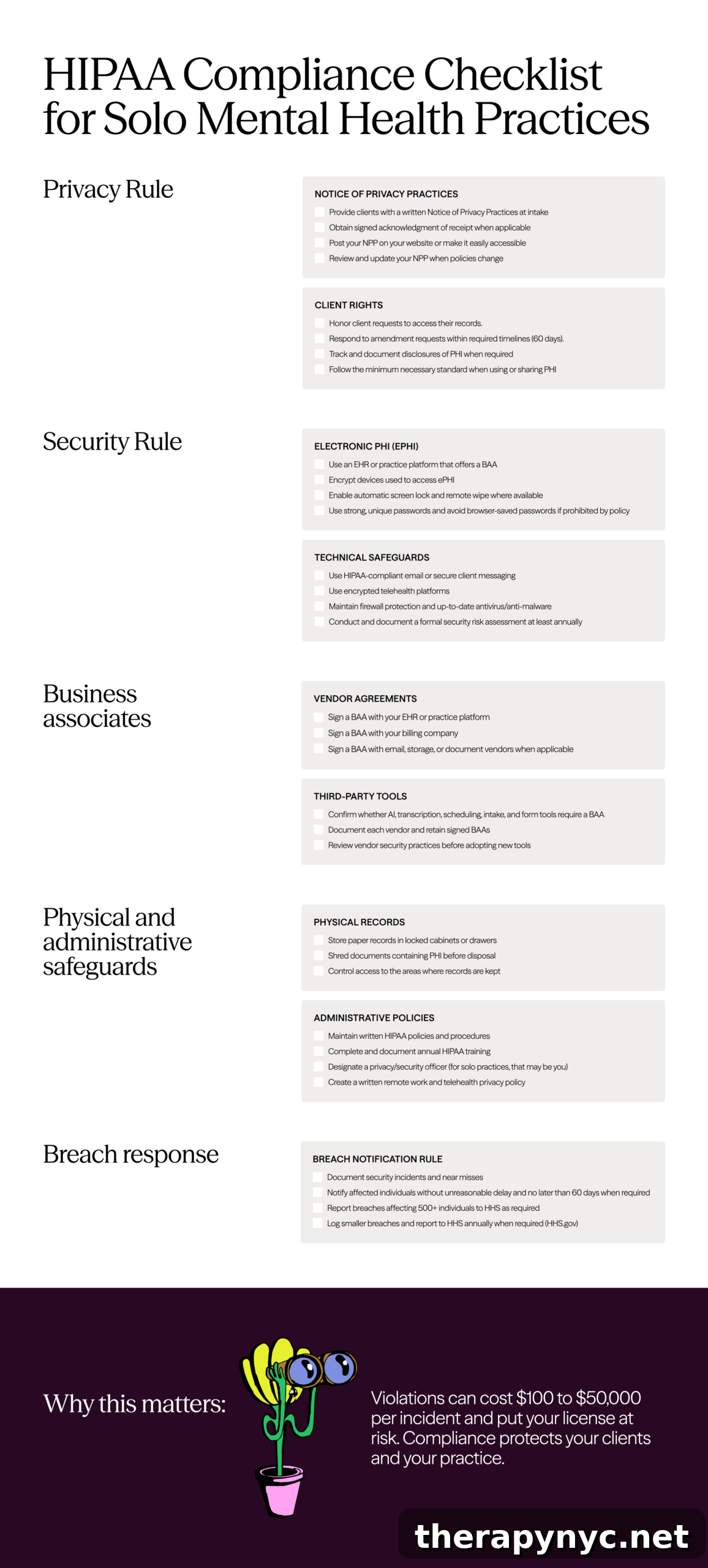
Use this practical checklist for a HIPAA-compliant home office